Editor’s Note: This article was originally published in March 2012. The Collusion add-on was later renamed to Lightbeam by Mozilla before eventually being discontinued. We have preserved this article for historical context on early privacy tools.
Mozilla, creator of Firefox, has launched a new add-on for its browser that allows users to have a view of which websites are watching them online as they browse every day. Collusion is an official Mozilla Firefox add-on developed by Atul Varma. The add-on was unveiled at the Technology, Entertainment and Design conference this week by Mozilla CEO Gary Kovacs.
Firefox Privacy Innovations
Mozilla Firefox is the second most popular web browser in the world, which is under heavy competition with Google Chrome. The Collusion add-on by Mozilla was released the same week Google started with its new privacy policy.
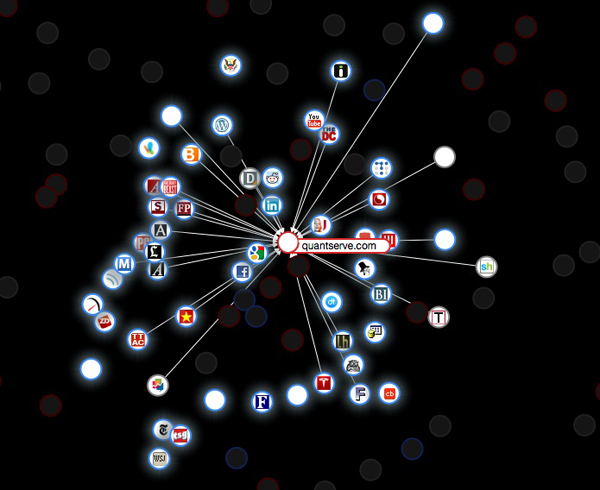
Collusion displays in real time what sites are tracking you and how they link to other sites. Once Collusion is installed, hitting the Collusion icon will open a new tab displaying how the sites you currently have open are being tracked by various third parties.
How Collusion Works
According to the official site, Collusion is an experimental add-on for Firefox that allows you to see all the third parties tracking your movements across the Web. It will show, in real time, how that data creates a web of interaction between companies and other trackers.
After you have installed Collusion from the Mozilla Firefox add-ons gallery, you enable it by clicking on Tools, then Add-ons, then Extensions, and clicking “Enable” next to Collusion. After that, you should see a small red circle on the bottom right of your browser.
Visualising Trackers
Now, just start browsing the Web as you normally would. To see the tracking graph build up, click on the Collusion icon in the bottom right of your screen. This will open a separate browser tab with your Collusion graph.
The glowing circles represent sites you have visited, and each line growing out of that circle is attached to a cookie the site or its advertisers have placed on your browser. Red circles are behavioural tracking cookies, and grey circles represent non-behavioural tracking cookies. However, Mozilla notes that those grey sites may still be tracking you across the web.
Just hover over any of the sites you have visited, and Collusion will highlight only the cookies connected with that site. As you browse, the graph is instantly updated and will continue to expand.
The Future of Web Privacy
Mozilla plans to build a database of offenders and make data available to privacy campaigners. With the full version of Collusion, users can opt in to sharing their anonymous data in a global database of web tracker data. The data is to help researchers, journalists, and others analyse and explain how data is tracked on the web.
Mozilla is among several companies that have become very focused on implementing do-not-track technology. Another Firefox and Internet Explorer add-on lets you block companies tracking you on the internet. When the same sites rely on the same tracking cookies, advertisers are able to effectively track users across the sites they visit, building up valuable data for market research.
Mozilla says that all tracking data Collusion collects is stored locally on your computer and never leaves your possession. You can reset the graph at any time to delete the database. The add-on also features an export function. Smaller tracking sites will detect if you have that add-on installed and ask you to stop the add-on for that particular site.
Tracking is the only way a site can make a living off the content that they produce. It would be great to make it easy for a website creator to be transparent. We hope the future will lead to an entirely different business model for the web where these sites that deliver really good content can still make money, users still get content, and user privacy is preserved.
