Editor’s Note: This article was originally published in 2012, highlighting the growing trend of modifying vintage manual typewriters with USB interfaces for modern computing.
An absolutely amazing invention has emerged for die-hard typewriter lovers. For those who have stubbornly not yet fully joined the modern computer age, preferring the satisfying clatter and ding of their heavy, inky typewriters, it might just be the perfect choice.
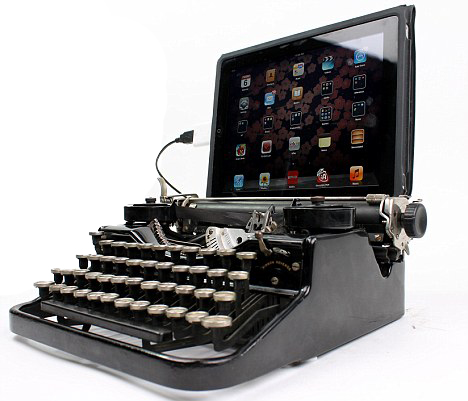
The vintage typewriters have been cleverly upgraded to fully include a handy USB portal, allowing them to be used seamlessly on a desktop computer, laptop, or even a modern tablet, perfectly including an Apple iPad.

Typewriter for the Digital Age
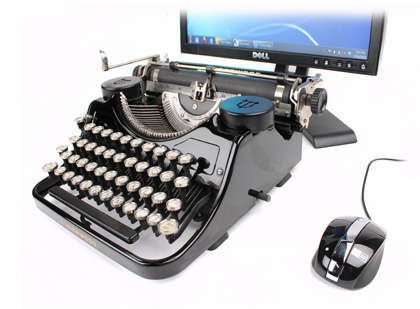
It is a true typewriter perfectly adapted for the modern digital age: An intricately upgraded model fully equipped with modern USB technology so it can easily work with completely modern computers and even an iPad. As the original computer keyboard was heavily based on the standard typewriter layout, nearly all of the main keys are exactly the same, allowing keen writers to happily type away and instantly see their work appear live on the screen.
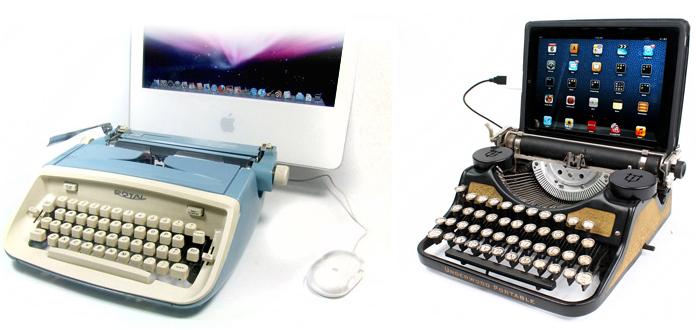
The clever makers over at usbtypewriter.com successfully built in a much-needed Control, Alt, and Backspace keys directly onto the classic typewriter. The crucial Enter button, which traditionally places the digital cursor down onto a brand new line, works exactly in the exact same physical way by simply using the heavy mechanical Carriage Return lever.
How the USB Typewriter Works
The ingenious USB Typewriter conversion system primarily consists of three incredibly important main electronic components: the Sensor Board, the USB Interface Board, and the precise Reed Switches.
The Sensor Board is a very long strip of highly flexible metal contacts which carefully clip directly underneath the mechanical keys of the typewriter. Each individual contact is securely attached to a completely different pin on a long chain of shift registers, instantly passing a digital signal straight down the line from one tiny pin to the next. When the electrical signal being passed directly down the row of shift registers is physically intercepted by one of the striking keys, the main microcontroller is instantly alerted to a specific key-press.
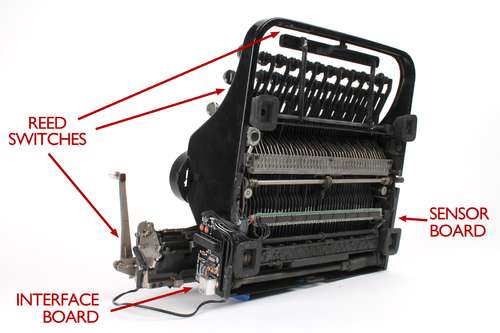
The USB Interface Board prominently features a reliable Atmega168P microcontroller, a standard USB socket, and some essential supporting electrical components. By constantly sending the CLK and SER signals, it effectively controls the entire operation of the main Sensor Board and, by carefully monitoring the central “chassis” signal, it can accurately detect all standard key-presses.
The Reed Switches: Because the main Sensor Board only detects keys that forcefully strike the mechanical crossbar, several incredibly important keys sadly go undetected. These crucially include the Shift, Space, and Return keys. To smartly deal with those specific keys, the system actively uses tiny magnetic reed switches that instantly close when placed safely in the close presence of a strong magnet.
Bridging the Gap Between Retro and Modern
DIY conversion kits are also currently on sale for roughly £50, which completely transforms old, dusty typewriters so they can be actively used in exactly the same way on totally modern computers. It is merely the very latest in a very long line of clever technology that actively upgrades ‘old-fashioned’ and incredibly ‘retro’ physical devices so they can be effectively used with completely modern computers.
The completely upgraded typewriters, which typically start at around £445 pre-assembled, can also still be used exactly the way they were originally intended—with the heavy mechanical keys loudly hitting the real paper straight through an inky ribbon.
