Sit in a straight posture and make sure your back is straight. Make sure your elbows are bent at a right angle. Face the computer screen by slightly tilting your head forward.
Don’t sit too far or too close to the screen. Sit at a comfortable distance. Make sure the distance between your eyes and the screen is around 45-70cm. This will help reduce the strain on your eyes.
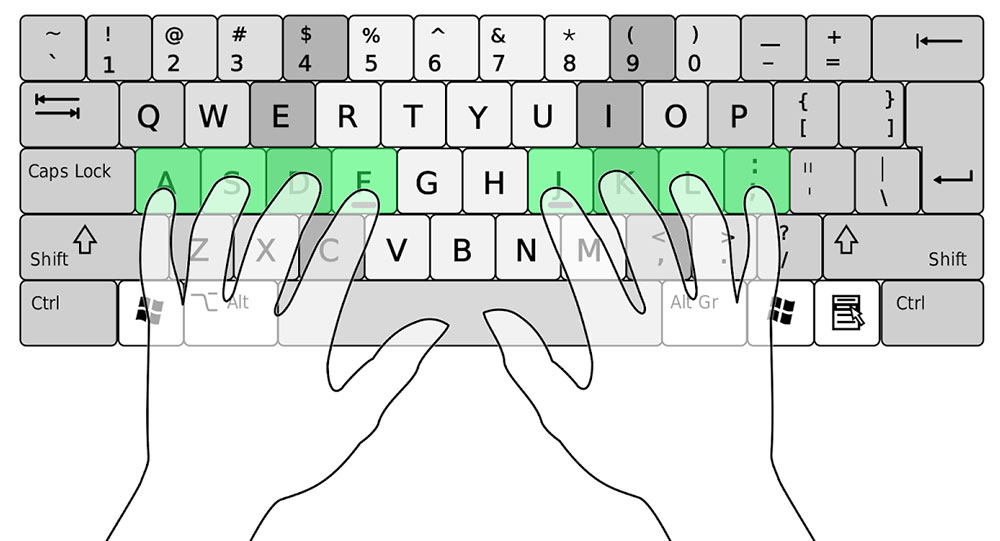
Rest your wrists on the tabletop in front of your keyboard. Place your fingers on the ASDF and JKL; keys. This is called the “home row”. Let your fingers return to this position when fingers are at rest.
Place your fingers on keys as follows:
• Letter A – Left pinky finger
• Letter S – Left ring finger
• Letter D – Left middle finger
• Letter F – Left index finger
• Letter J – Right index finger
• Letter K – Right middle finger
• Letter L – Right ring finger
• Colon/semicolon :; – Right pinky finger
• Space bar – Left and right thumbs
Memorize the order of letters and punctuation keys on the keyboard. This will help you to type faster without looking at the keyboard.